

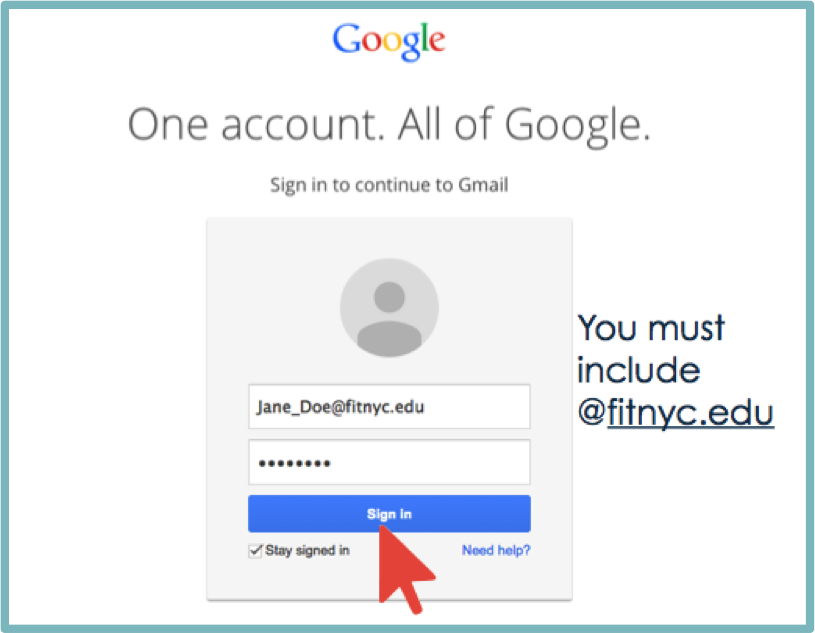
How to Log into Your Account: A Step-by-Step Guide
In today’s digital age, logging into your online accounts has become a daily routine. Whether it’s for social media, banking, or email, accessing your accounts securely and efficiently is crucial. This article will guide you through the process of logging into your account, ensuring that you can do so with confidence and ease.
Understanding the Login Process
The login process generally involves entering your username and password into the appropriate fields on a website or application. This basic process may seem straightforward, but various factors can influence its security and effectiveness. Before diving into the different steps, it’s essential to understand the importance of vigilance in protecting your login credentials.

Step 1: Navigate to the Login Page
The first step in logging into your account is locating the login page. Most websites have a clearly marked ‘Login’ or ‘Sign In’ button, typically found at the top right corner of the homepage. Clicking this button will direct you to the login interface.
Step 2: Enter Your Credentials
Once you’re on the login page, you’ll typically see two primary fields: one for your username (or email) and the other for your password. Enter your credentials carefully, as these are key to accessing your account securely. Ensure that caps lock is off, and be aware of any spaces before or after your entered email or password.
Choosing a Strong Password
Having a strong password is vital in safeguarding your account. A good password usually contains a mix of letters (both uppercase and lowercase), numbers, and symbols. Aim for at least 12 characters in length. Avoid easily guessable passwords, such as «123456» or «password,» and consider using a password manager to generate and store complex passwords.
Step 3: Two-Factor Authentication (Optional)
If you’ve enabled two-factor authentication (2FA) for your account, after entering your username and password, you will receive a verification code via SMS, email, or an authentication app. This extra layer of security significantly enhances your account’s protection and is highly recommended.

Step 4: Select the “Remember Me” Option (Optional)
Many login pages offer the option to «Remember Me» or «Stay Signed In.» If you’re using a personal device and wish to skip entering your credentials every time, you may select this option. However, refrain from using this on public or shared devices to ensure your account’s security.
Step 5: Access Your Account
After you’ve entered the necessary information, click the «Login» or «Sign In» button. If your credentials are correct, you’ll be directed to your account’s homepage or dashboard. If not, double-check your credentials for any typos or errors. In case you forgot your password, look for the «Forgot Password?» link; this will guide you through the recovery process.
Troubleshooting Common Login Issues
Sometimes, you may encounter issues while trying to log in. Here are some common problems and their solutions:
Incorrect Password
If you receive an «Incorrect password» message, try resetting your password using the aforementioned link. Always ensure you can access the email linked to your account for password recovery.
Account Locked
Repeated failed login attempts can lead to your account being temporarily locked. Wait for the specified period, and then attempt to log in again. If the issue persists, contact customer support for assistance.
Technical Issues
Sometimes, technical difficulties may prevent a successful login. Ensure your internet connection is stable, clear your browser cache, or try a different browser or device. If the problem continues, the website may be experiencing outages. Check their official social media or status page for updates.
Staying Secure While Logging In
Security should always be a priority when accessing your accounts. Here are some tips to enhance your online safety:
- Use a secure connection: Always log in using a secure Wi-Fi connection. Avoid public Wi-Fi for sensitive transactions.
- Keep software updated: Ensure your browser and any installed security software are up-to-date to protection against vulnerabilities.
- Beware of phishing scams: Be cautious of emails or messages prompting you to log in through external links. Always navigate to the official website directly through your browser.
- Regularly update passwords: Change your passwords periodically and don’t reuse them across various accounts.
Conclusion
Logging into your account is a simple yet essential part of navigating the digital world. By following these steps, implementing strong security measures, and troubleshooting common issues, you can ensure a smoother and safer login experience. Remember, staying diligent and proactive about your online security is as important as the process itself.
For more information and detailed guidance on accessing your Facebook account securely, you can check out the following link: How to Log into Your Facebook Account Using an Anti-Detect Browser? https://crazyfb.shop/en/page/kak-voyti-v-facebook-akkaunt-cherez-antidekt-brauzer

 Carretera a la unión S/N colonia
  Tel. (871) 7 50 77 00
 Fax. (871) 7 50 86 97
 idi_97@hotmail.com